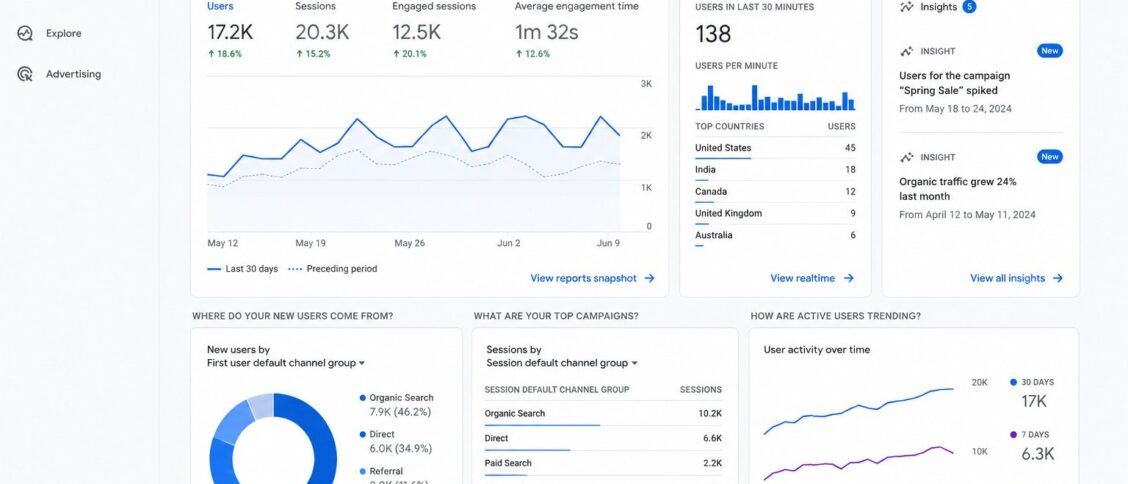
Google Analytics 4 (GA4) is Google’s current analytics platform, released as the successor to Universal Analytics in October 2020 and made the default for new properties in October 2020. Beginning July 1, 2023, Universal Analytics stops processing new data, making GA4 the only Google Analytics option going forward. For any business with a Google Analytics setup, the migration from Universal Analytics to GA4 is not optional; it is a deadline.
This post walks through what GA4 actually changes from Universal Analytics, the new event-based data model that underpins everything, the practical features that matter most, how to set GA4 up alongside your existing UA installation, and what to do about the data already collected in Universal Analytics. For broader analytics context, see our coverage of Microsoft Clarity (the qualitative complement to GA4’s quantitative analysis) and our other analytics posts.
What Google Analytics 4 actually is
GA4 is the fourth major iteration of Google’s analytics product. It replaces Universal Analytics (the third generation, which dominated web analytics for nearly a decade) with a fundamentally different data model.
The core architectural change:
- Universal Analytics used a session-based model: visits were grouped into “sessions” defined by various rules (page views within 30 minutes, distinct visitor IDs, traffic source changes). Metrics were calculated against sessions: bounce rate, average session duration, pages per session.
- GA4 uses an event-based model: every user interaction is an event with parameters. Page views, button clicks, video plays, scroll depth, form submissions, and custom events you define are all events in the same data structure. Sessions still exist as a derived concept but are not the primary unit of analysis.
The change reflects how analytics is actually used in modern web and app contexts. Single-page applications, mobile apps, and cross-platform user journeys do not fit the session model cleanly. Event-based data does fit, and once you have event-based data, you can derive whatever session-like metrics you want from it.
A second important change: GA4 unifies web and app analytics in one property. Universal Analytics treated them as separate Firebase Analytics versus web Analytics setups. GA4 treats a "property" as a customer experience that may span web and app surfaces, with cross-platform user journeys analyzable as one path.
How GA4 differs from Universal Analytics
The differences that matter most for daily use:
- Different conversion definitions: Universal Analytics had “goals” defined per view with specific conditions. GA4 has “conversion events” defined at the property level. The migration requires reconceptualizing goals as events.
- Attribution model changes: GA4 uses data-driven attribution by default (machine learning to assign credit across touchpoints), where UA defaulted to last-click. The reported conversion credits can shift significantly under the new attribution.
- No more bounce rate as a primary metric: GA4 reports “engaged sessions” and “engagement rate” instead of bounce rate. The new metric reflects whether a session involved meaningful interaction; the old metric reflected whether the session had multiple page views.
- UI redesign: GA4’s interface is substantially different from UA’s. Reports are organized differently; the navigation pattern is new; customizations from UA do not transfer automatically. Teams accustomed to UA need to learn the new interface.
- Different data retention defaults: GA4 defaults to shorter retention (2 months for user-level data, expandable to 14 months). UA retained data for longer by default. Adjust the retention setting after creating the property.
- BigQuery export is free: GA4 includes free BigQuery integration for all properties. UA’s BigQuery export was a paid GA 360 feature only. For data-driven teams, this is a significant gain.
The net of these changes: GA4 is more capable than UA for the questions modern web analytics actually needs to answer, but it requires relearning the tool. Teams that ignored the migration through 2022 face a compressed learning curve before the July 2023 UA sunset.
Key GA4 features for practitioners
The capabilities a typical analytics user works with day to day:
- Automatic event collection: GA4 automatically tracks several event types (page_view, scroll, click on outbound link, file_download, video_start/progress/complete, site_search) without configuration. This is more than UA tracked automatically.
- Enhanced measurement: a property-level toggle that turns on the automatic events plus several additional automatic measurements (form interactions, site search, scrolls).
- Custom events: define events specific to your site’s needs through tag manager (Google Tag Manager, GTM) or via GA4’s own event configuration interface.
- Conversions: mark events as conversions; GA4 reports conversion volume and value, and uses conversions in attribution modeling.
- Audiences: define user segments based on behavior, demographics, or custom criteria. Used in reporting and in Google Ads remarketing.
- Explorations: GA4’s ad-hoc analysis interface (funnel, path, segment overlap, cohort, free-form). Replaces UA’s custom reports with a more flexible toolkit.
- Standard reports: acquisition, engagement, monetization, retention reports out of the box.
- Real-time reports: what’s happening right now on your site (similar to UA’s real-time view).
For a marketing or content team migrating from UA, the priority is rebuilding the reports they used most often in UA’s GA4 equivalents. The exact mapping is not one-to-one, which is the migration’s biggest practical challenge.
Setting up Google Analytics 4
The setup process, assuming you already have a UA property:
- Create a GA4 property: from the UA admin, use the GA4 Setup Assistant. It creates a parallel GA4 property and copies as much UA configuration as it can.
- Install the GA4 tag: either through Google Tag Manager (recommended) or directly in the site’s HTML. The tag can run alongside the UA tag during the migration period.
- Configure enhanced measurement: toggle on for the events you want automatically tracked.
- Set up conversions: identify the events that should be tracked as conversions; mark them in the GA4 admin.
- Adjust data retention: default is 2 months; consider 14 months for most use cases.
- Link Google Ads, Search Console, BigQuery: integration setup if you use those tools.
- Validate data: compare GA4’s reported numbers to UA’s during the parallel-tag period to identify configuration gaps.
The parallel-tag period (running UA and GA4 simultaneously) is critical. It lets you compare data, identify discrepancies, and complete the GA4 configuration before UA sunsets in July 2023.
What to do about your existing Universal Analytics setup
Three actions matter:
- Export historical UA data: after July 1, 2023, UA stops processing new data but historical data remains accessible for at least six months (Google has stated longer timelines are possible). Export the historical data you want to preserve. Options: standard CSV exports, BigQuery export (paid GA 360 only), or third-party tools that pull GA data via API.
- Document conversion definitions: write down what each UA goal measured and how it was defined. This becomes the spec for the equivalent GA4 conversion event.
- Document custom reports and dashboards: any UA custom reports that the team relies on need GA4 equivalents built. Document the reports first; rebuild them in GA4.
The teams that did this work in 2022 entered 2023 with a clean GA4 setup. The teams that did not faced compressed timelines and incomplete data continuity at the UA sunset.
Update (2026-05-12): the GA4 landscape since this post first published.
Several things have changed since the original December 2022 publication:
- Universal Analytics stopped processing data July 1, 2023 as scheduled. Historical UA data has remained available longer than Google’s initial guidance suggested, though long-term retention is not guaranteed.
- GA4 has matured significantly in the years since. The reports are more polished, the Explorations interface is more capable, and the learning resources (official documentation, third-party guides) have proliferated.
- AI-powered insights have been added: GA4 surfaces anomalies and trends automatically, similar to what Copilot in Microsoft Clarity does for behavioral analytics.
- Privacy-related changes have continued. Third-party cookie deprecation (delayed multiple times) reshapes attribution; Consent Mode v2 (effective March 2024) added required signaling for European users; iOS App Tracking Transparency continues to affect mobile measurement.
- Cross-platform measurement has improved, particularly for businesses operating both web and app surfaces.
- The migration deadline pressure is gone; GA4 is now the only Google Analytics option, full stop. The conversation has shifted from "should I migrate" to "how do I use it well."
If you are setting up Google Analytics for a new property in 2026, GA4 is the only option. If you maintained a working GA4 setup through the migration period, the additional features added since may justify revisiting the configuration to take advantage of capabilities that did not exist when you first deployed.
Frequently Asked Questions
Do I have to migrate from Universal Analytics to GA4?
Yes. Universal Analytics stops processing new data on July 1, 2023. After that date, any analytics data collection requires GA4. The deadline is firm; there is no extension path that keeps UA processing data.
Is GA4 free?
Yes, like Universal Analytics before it. GA4 has a paid tier (GA 360) for enterprise customers with higher data volumes and additional features, but the standard GA4 is free.
How is GA4 different from GA 360?
GA 360 is the enterprise tier with higher data limits, longer data retention, more advanced features, and SLA-backed support. The free GA4 is sufficient for the vast majority of businesses; GA 360 is for organizations with very high traffic volumes or specific enterprise feature requirements.
Can I still use my Universal Analytics historical data?
Through at least 2024, yes. Google’s stated timeline is “at least six months” after the July 2023 sunset, but historical access has continued longer in practice. The reliable strategy is to export the historical data you want to preserve to a system you control (BigQuery, your data warehouse, CSVs in secure storage) rather than depending on Google’s long-term retention.
Does GA4 work with my CMS or e-commerce platform?
GA4 works with any web platform that allows custom JavaScript tags (essentially all major CMSs and e-commerce platforms). For specific platforms (WordPress, Shopify, Wix, Squarespace), plugins or built-in integrations simplify the setup. For specific e-commerce platforms (Shopify, WooCommer