What is multi-factor authentication? Multi-factor authentication (MFA) is a security practice that requires a user to present two or more different types of credentials to verify their identity before being granted access to an account, application, or system. Where a password-only login asks "do you know the secret?", MFA additionally asks "do you have the right device?" or "are you the right person?". The combination makes accounts substantially harder to compromise: a stolen password alone isn’t enough to break in.
This post walks through what MFA actually is, the three factor types, the most common MFA methods you’ll encounter, why MFA matters for small businesses and individuals, the difference between MFA and the closely-related term 2FA, and the realistic limitations MFA does and doesn’t protect against.
The three authentication factors
Authentication factors come in three classic categories, and MFA means combining factors from at least two different categories.
- Something you know: a password, a PIN, a security question’s answer. The factor depends on the user remembering a secret.
- Something you have: a physical device (a smartphone, a hardware security key, a smartcard) or a piece of software running on a device (an authenticator app). The factor depends on the user possessing the right thing.
- Something you are: a biometric trait (a fingerprint, a face scan, a voice match, an iris scan). The factor depends on the user being a specific person.
Multi-factor means combining factors from at least two different categories. Asking for a password and then asking a security question is not MFA, because both are the same factor type (something you know). Asking for a password and then a code from an authenticator app is MFA because the password is something you know and the code requires something you have.
The most common MFA methods
In practice, most people encounter a handful of MFA implementations.
SMS codes: after entering your password, the service sends a numeric code to your phone via text message. You enter the code to complete login. This was the original consumer MFA method and is still the most widely deployed. It’s better than password alone, but SMS is the weakest MFA method because text messages can be intercepted (SIM swap attacks), and major security frameworks now recommend stronger methods where available.
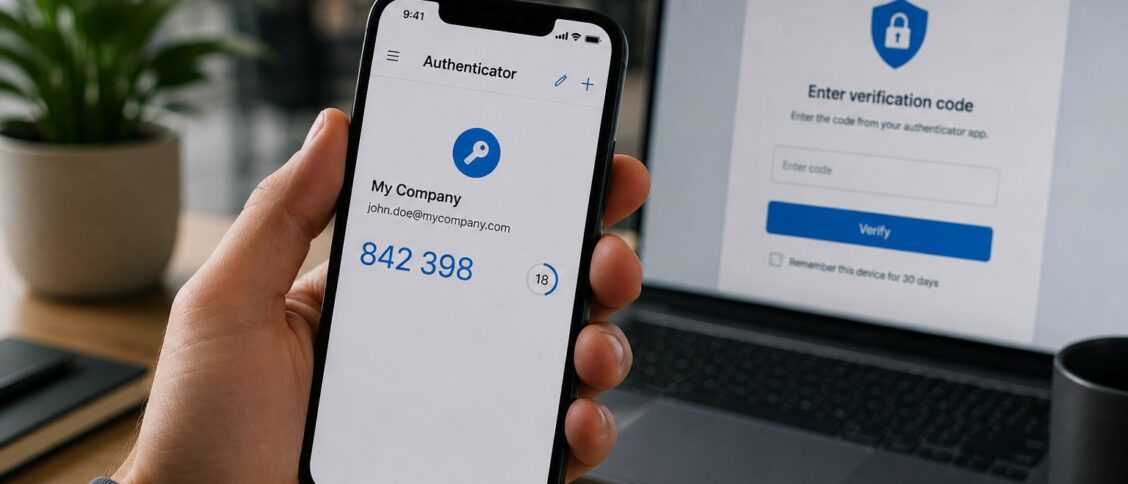
Authenticator apps (Google Authenticator, Microsoft Authenticator, Authy, Duo, 1Password): a smartphone app generates time-based codes that change every 30 seconds. After entering your password, you enter the current code from the app. This is significantly stronger than SMS because the codes never leave your device. Authenticator apps work without cellular service, making them more reliable than SMS in many cases.
Push notifications: instead of typing a code, you receive a push notification on your phone asking "did you just try to sign in?" with an Approve/Deny button. Microsoft Authenticator, Duo Push, and various identity providers offer this. The user experience is faster than entering codes; the security is roughly equivalent to authenticator-app codes provided the user is careful about which prompts they approve.
Hardware security keys (YubiKey, Google Titan, Feitian): a physical device you plug into your computer or tap to your phone via NFC. The key uses cryptographic protocols (FIDO2, WebAuthn) to prove your identity to the service. Hardware keys are the strongest widely-available MFA method for most consumers and small businesses; they resist phishing in ways that codes and push notifications don’t.
Biometric authentication: fingerprint or face recognition on a smartphone or laptop. Most often used as a second factor or as a way to unlock an authenticator app rather than as the sole factor.
Passkeys: a newer authentication standard (built on FIDO2/WebAuthn) that combines a device-bound cryptographic credential with a local biometric unlock. Passkeys aren’t strictly MFA in the traditional sense, but they accomplish the same security goal (resistance to phishing and password theft) by eliminating the password entirely. Adoption is growing across major platforms.
Why MFA matters
Passwords alone are not enough to keep accounts secure. The problem isn’t theoretical: large-scale credential-stuffing attacks (where attackers use lists of leaked username-password combinations against many services) are a continuous background threat for any business with a customer login. Phishing attacks routinely capture passwords through fake login pages. Re-used passwords across services mean a breach at one service compromises accounts at every other service where the same password was used.
The Cybersecurity and Infrastructure Security Agency (CISA) has consistently named MFA as one of the highest-impact, lowest-cost security improvements an organization can make. Microsoft has published data suggesting MFA blocks the overwhelming majority of automated account-compromise attacks, with figures often quoted above 99% for the categories of attack MFA is designed to defend against.
For small businesses, the case is especially strong. Small businesses are common targets because attackers assume security is weaker and account compromises can lead to ransomware, business email compromise (where attackers impersonate executives to redirect wire transfers), or theft of customer data. The cost of an MFA rollout is small; the cost of a successful business email compromise can be in the tens or hundreds of thousands of dollars per incident.
MFA vs. 2FA: are they the same?
The terms are often used interchangeably, but there’s a precise difference.
Two-factor authentication (2FA) is the specific case of MFA where exactly two factors are required. A password plus an SMS code is 2FA.
Multi-factor authentication (MFA) is the broader term that includes 2FA plus any case where three or more factors are required (password plus authenticator app plus fingerprint, for example).
In casual usage, "2FA" and "MFA" mean the same thing for almost every consumer-facing implementation. Most services that offer "MFA" really offer 2FA: password plus one additional factor. Three-factor MFA is rare in consumer products but appears in some high-security business environments.
What MFA protects against (and what it doesn’t)
MFA is highly effective against several common attack patterns:
- Password theft via breach: even if an attacker gets your password from a leaked database, they still need the second factor to log in.
- Credential stuffing: automated attacks that try millions of leaked username-password pairs against your service. MFA stops these even with valid passwords.
- Phishing of passwords: many MFA methods (especially hardware keys and properly-implemented passkeys) prevent attackers from using a phished password.
- Casual unauthorized access: a coworker, family member, or laptop thief who guesses or finds your password still can’t get in.
MFA is less effective or ineffective against several other attack patterns:
- Phishing of MFA codes: a phishing site that captures both your password and your one-time code can sometimes use both immediately to log in. Hardware keys and passkeys resist this; SMS codes and authenticator apps don’t fully.
- SIM swapping: attackers convince a mobile carrier to transfer your phone number to a SIM they control, then intercept SMS codes. SMS-based MFA is vulnerable to this; authenticator apps and hardware keys are not.
- MFA fatigue attacks: attackers repeatedly trigger push-notification prompts hoping the user eventually approves one out of habit or to make the notifications stop. Stronger push-notification implementations require the user to enter a code shown on the login screen, which blocks this.
- Session hijacking after login: if an attacker steals an authenticated session cookie (through malware on your machine, for example), MFA at login doesn’t help.
- Account recovery flows: MFA on the main login is only as strong as the weakest recovery path. If “forgot password” routes to an unsecured email account, the recovery flow becomes the attack vector.
The takeaway: MFA is a meaningful improvement, not a perfect defense. Combined with strong unique passwords, a password manager, awareness training, and good account recovery hygiene, MFA closes most of the highest-frequency attack vectors. By itself it’s a piece of the puzzle, not the whole solution.
How to enable MFA in practice
For individuals: start with email, banking, and any service that controls other accounts (Google, Microsoft, Apple, your password manager). Enable MFA on those first. Most consumer services have it under account or security settings.
For small businesses: enable MFA across the company on email (Microsoft 365, Google Workspace), accounting software, payment processing, cloud infrastructure, and any system that stores customer data. Pick a single authenticator app or push-notification provider rather than letting employees choose their own (consistency makes support and offboarding easier). Plan for hardware tokens for admin accounts; those are the highest-value targets.
For enterprises: deploy MFA through your identity provider (Microsoft Entra ID, Okta, Ping Identity, Google Cloud Identity) with policy-driven enforcement, conditional access, and a roadmap toward phishing-resistant methods (hardware keys, certificate-based auth, passkeys) for the most sensitive applications.
Frequently Asked Questions
Is MFA the same as two-factor authentication (2FA)?
2FA is the specific case of MFA where exactly two factors are required. MFA is the broader term that covers two or more factors. In everyday usage, the two terms are interchangeable for most consumer services, since virtually all of them implement 2FA rather than three-factor or higher.
Is SMS-based MFA still safe to use?
SMS-based MFA is substantially better than no MFA but is the weakest widely-deployed MFA method. The vulnerability is SIM swapping (where attackers transfer your phone number to a SIM they control) and SS7 protocol attacks against the cellular network itself. For accounts that control significant value (banking, email, accounts that control other accounts), use authenticator apps, push notifications, or hardware keys instead. For lower-stakes accounts, SMS MFA still helps and is better than passwords alone.
What’s the strongest MFA method available?
For most consumers and businesses, hardware security keys (YubiKey, Google Titan, Feitian) using the FIDO2/WebAuthn standard are the strongest practical MFA method. They resist phishing, SIM swapping, and most remote attack vectors because the cryptographic protocol verifies the legitimate site, not just the user’s possession of a code. Passkeys (built on the same FIDO2 foundation but with a device-bound credential rather than a physical key) offer similar security with better user experience.
Do I need MFA on every account?
Practical advice: enable MFA on every account that’s worth protecting, prioritizing in order of impact. The highest-priority accounts are anything that controls other accounts (email is the top one, because most password resets go through email), financial accounts (banking, payment processing), and business-critical accounts (cloud infrastructure, code repositories, customer data systems). Lower-priority accounts (forums, casual services) benefit from MFA but the case is weaker.
What happens if I lose my MFA device?
Every reputable service provides account recovery options for users who lose their MFA device. The common approaches are backup codes (one-time codes you save in advance), backup authentication methods (a second registered device, a registered phone number), and identity-verification recovery flows (proving identity through other means). The right preparation is to save backup codes in a safe place and register a second MFA method when the service supports it. Without preparation, account recovery can be a multi-day support process or worse.